| # | Problem | Pass Rate (passed user / total user) |
|---|---|---|
| 11275 | Sentence Reversal |
|
| 12544 | Simple Web Crawer |
|
| 12570 | LAB12_Useful library functions |
|
Description
In this problem, you are given several sentences, and you have to print the reversal of each of them.
A reversal of a sentence is the reversed order of words in the original sentence. For example, for the input string "this is a book", the result should be "book a is this".
Hint 1: we suggest you to do the task by a recursive function. The function seeks the first word from current location, and call itself recursively. Before each return, the function will print the word it found. Then all words will be printed in the reversed order.
The function prototype is something like this:
void sentence_reversal( char *now ) ; // which seek the first word from *now, and pass an new *now location to the called function
And the recursion is like the following figure:
this (4th printed word)
-> is (3rd printed word)
-> a (2nd printed word)
-> book (1st printed word)
Hint 2: Print the spaces between words, and there should be no blanks (spaces) at the begin or the end of new sentences. If the original sentence has only one word, print the word directly without any spaces.
Note: Another method to solve this problem is seeking words from the end of the original sentence. But we strongly recommend you to try the recursive way as a practice.
Hint 3: Use fgets(). (https://www.dummies.com/programming/c/how-to-use-the-fgets-function-for-text-input-in-c-programming/)
Input
There are several lines of input, and each line presents a sentence.
No lines are longer than 500 characters, and there will be no empty lines. At most 10 sentences will appear in a test case.
Words in sentences are separated by a space (' '). There will be no continuous spaces, or any spaces at the beginning or end of the sentences.
Output
Print out each reversal sentence. All words in a reversal sentence are separated by a space, and there is a '\n' at the end of each line.
Sample Input Download
Sample Output Download
Tags
Discuss
Description
A Web crawler, sometimes called a spider or spiderbot and often shortened to crawler, is an Internet bot that systematically browses the World Wide Web.
Generally, a Web crawler visits a website, reads the HTML code of the website, gathers information it wants, and probably wants to visit the links it found in this website.
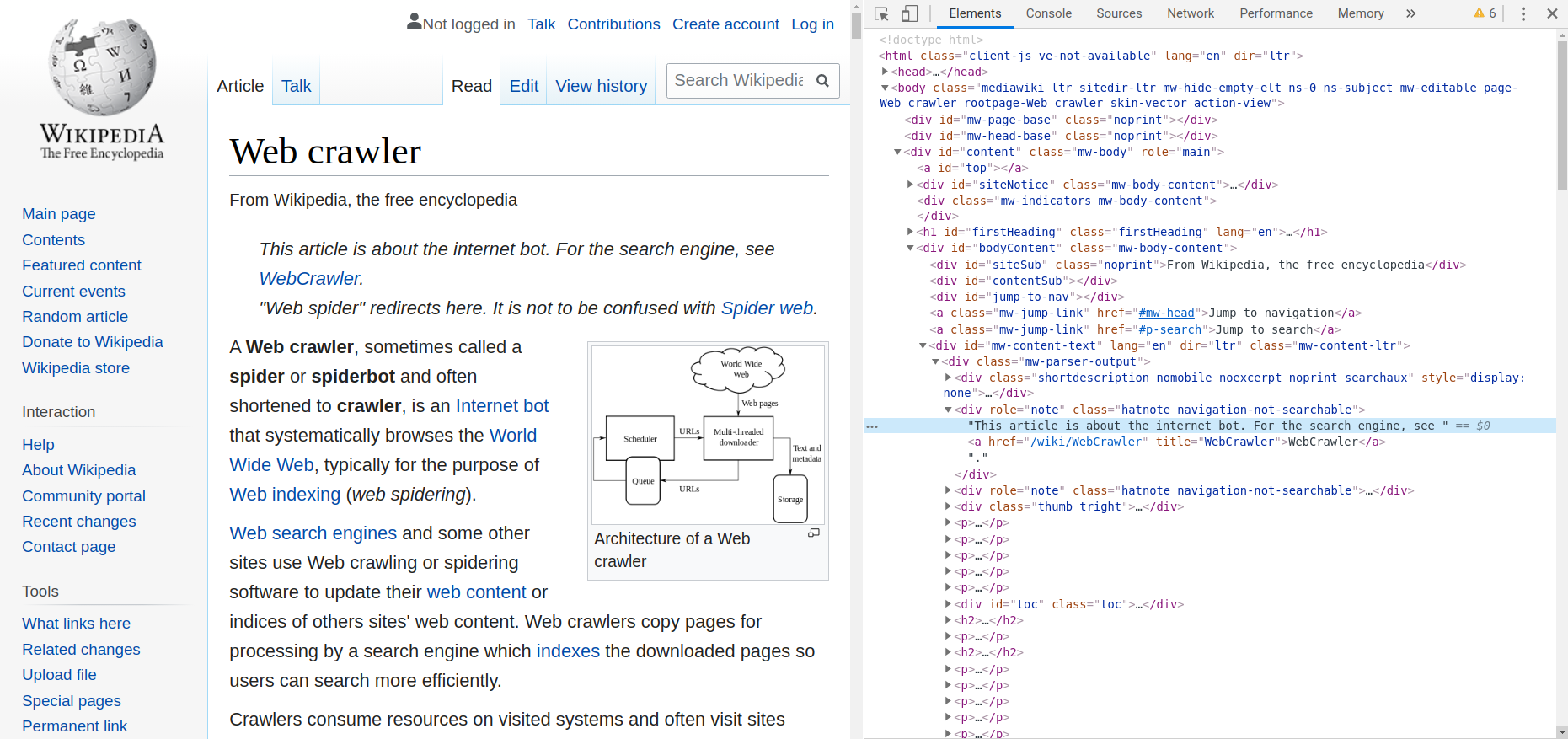
For example, if a Web Crawler visits the wikipedia webpage introducing "Web crawer" (the webpage is shown in the left part of the image) ...
-
It reads the html code of the webpage (shown in the right part of the image)
-
It gathers information. For example,
-
It finds the definition of "Web Crawler"
-
It finds several links (i.e. the blue words in the webpage), such as links to "Internet bot", "World Wide Web", etc.
-
-
It probably wants to visit the links "Internet bot", "World Wide Web", ... one by one to get more information.
In this problem, you are going to implement a simple Web crawler. Given the html code of some website, you are going to output several information :
-
Title of the website
The title of the website is the string placed within <title> and </title>, for example, the title in sample input is "This is the title".
-
Numbers of links in this webpage
A link in html is in the following syntax : <a href="url">link text</a>, where url is the link address and link text is the text of the link.
Refer to the to Sample IO for output format.
Hints
-
What is html code?
-
In this problem, you only need to know that html code are several lines of strings in some special format.
-
html code are tags in the following format :
<tagname>contents of tag</tagname> -
In Chrome, you can press
F12key to see the html code of the website
-
-
How to read in html codes?
-
Some useful functions you've learned in previous homework 12507 - Searching Remark :
-
char *strtok(char *str, const char *delim)- to break stringstrinto a series of tokens using the delimiterdelim, which is defined understring.h -
char *fgets(char *str, int n, FILE *stream)- to read a string of lengthninto stringstrfrom a file streamstream(e.g.stdin), which is defined understdio.h
-
-
How to find title?
-
Why not start with finding the position of
<title>and</title>? The substring between<title>and</title>is the title of the website.
-
-
How to count links?
-
For every link in html, it must contains the substring
</a>. This problem can be solved by counting the number of occurrence of</a>.
-
Input
You will be given a HTML code. Input contains at most 100 lines. Each line contains at most 1000 characters.
Technical Restrictions
Only the following tags will appear in the input :
-
<html> </html> -
<head> </head> -
<body> </body> -
<title> </title> -
<a> </a> -
<h1> </h1> -
<p> </p>
All tags except for <head></head> and <body></body> will be on the same line.
In each case, there will be exactly one <head></head>, one <body></body>, one <title></title>.
It is guaranteed that the contents of tags will not contain '<' or '>'.
Output
For the first line, please output the title of the given website.
For the second line, please output the number of links in the given website.
Remember to add new line character in the end of each line.
Sample Input Download
Sample Output Download
Tags
Discuss
Description
char * fgets ( char * str, int num, FILE * stream );
Reads characters from stream and stores them as a C string into str until (num-1) characters have been read or either a newline or the end-of-file is reached, whichever happens first.
A newline character makes fgets stop reading, but it is considered a valid character by the function and included in the string copied to str.
A terminating null character is automatically appended after the characters copied to str.
/* fgets example */
#include <stdio.h>

int main()
{
   FILE * pFile;
   char mystring [100];

   pFile = fopen ("myfile.txt" , "r");
   if (pFile == NULL) perror ("Error opening file");
   else {
     if ( fgets (mystring , 100 , pFile) != NULL )
       puts (mystring);
     fclose (pFile);
   }
   return 0;
}
char * strtok ( char * str, const char * delimiters );
A sequence of calls to this function split str into tokens, which are sequences of contiguous characters separated by any of the characters that are part of delimiters.
On a first call, the function expects a C string as argument for str, whose first character is used as the starting location to scan for tokens. In subsequent calls, the function expects a null pointer and uses the position right after the end of the last token as the new starting location for scanning.
To determine the beginning and the end of a token, the function first scans from the starting location for the first character not contained in delimiters (which becomes the beginning of the token). And then scans starting from this beginning of the token for the first character contained in delimiters, which becomes the end of the token. The scan also stops if the terminating null character is found.
This end of the token is automatically replaced by a null-character, and the beginning of the token is returned by the function.
Once the terminating null character of str is found in a call to strtok, all subsequent calls to this function (with a null pointer as the first argument) return a null pointer.
The point where the last token was found is kept internally by the function to be used on the next call (particular library implementations are not required to avoid data races).
/* strtok example */
#include <stdio.h>
#include <string.h>

int main ()
{
  char str[] ="- This, a sample string.";
  char * pch;
  printf ("Splitting string \"%s\" into tokens:\n",str);
  pch = strtok (str," ,.-");
  while (pch != NULL)
  {
    printf ("%s\n",pch);
    pch = strtok (NULL, " ,.-");
  }
  return 0;
}